
If you’ve upgraded to one of the ribbon-interface versions of Microsoft Office recently, you may have noticed that every new document you create (as opposed to editing or making new documents from earlier ones) has this weird, more open line spacing.
What’s the story?
Well, it seems that Microsoft, in its infinite wisdom, decided that since we’re all posting documents on the Interwebs, we could all do with a more online-friendly line spacing scheme. So they made line spacing in the Normal template 1.15 instead of 1. By default.
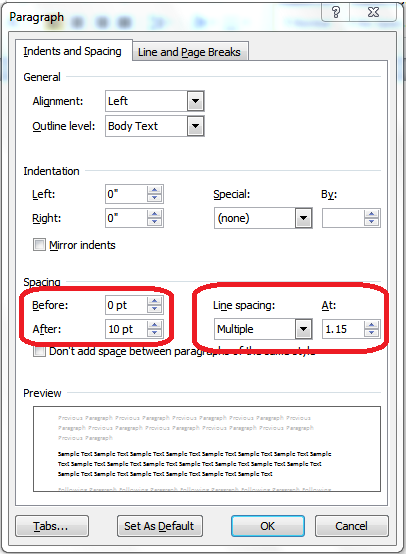
Um … no.
If you want to change the default back to that single line spacing that looks good on paper, then here’s what you do:
- On the home tab of the ribbon, find the Styles section (on the right). You’ll see a drop-down called Change Styles. Click it, then choose Style Set, then click on Word 2003 (which will change the default styles for that document to the ones where Normal paragraphs have single spacing with no extra space after paragraphs.
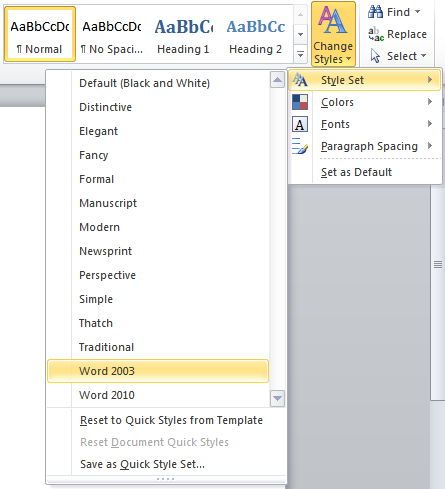
- To make this change effective for all new documents based on the Normal template, drop this menu down again, and choose Set as Default.
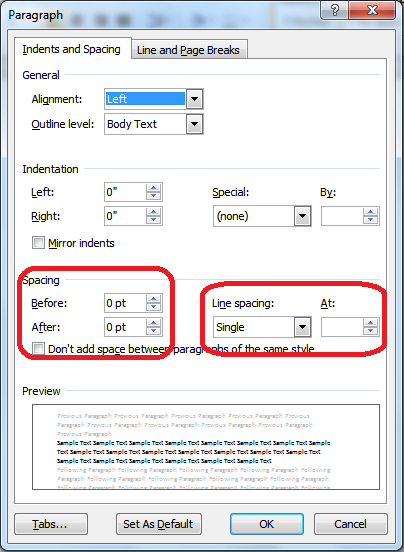
- Now, when you review your Paragraph dialog box, you’ll see this:
Hat tip to the Microsoft Office Knowledge Base for this one.

Well, this is the 3rd “can’t miss” instruction set I’ve tried on how to default all documents to single space. Unfortunately, this doesn’t work for me either. Followed all steps, closed Word, and when I re-opened Word the line spacing was set back to 1.15. I’m sure this works for others, but it just does not do the job on my Word 2010. The hunt for the solution goes on! Thanks anyway.
Right, Mel, I followed the directions many times and nothing changes. Why on earth would you not make single spacing the default, and if you did go down that road to nowhere, couldn’t you at least make your directions for changing it back WORK? Word 2010 is just plain dismal.
Well, I hate that this is not working for you. You might instead try the method recommended on Small City Law Firm Tech (http://vmanning.posthaven.com/why-oh-why-wont-it-stick-changing-word-2010-f) – perhaps that will work better.
Thanks for this information. It worked perfectly for me.
Fantastic – glad it helped!
I tried it and it worked for me on the first try. Thanks.
Good – glad to see that method’s working well!
For many, this procedure becomes a challenge, because it doesn’t always work. I spent a long time trying everything I could think of to get a default for the Normal document that was different than Calibri/11/1.5 spacing. Here’s what worked for me. It is the location of the template that counts, not the properties of the template. I had to MOVE my modified template to c:\users\appdata\roaming\microsoft\templates. There was no Normal template in the folder, until I moved it there. This worked for me, and I hope it works for you.
Amazing!! Thank you Bluehole. This finally worked. I have Microsoft Word 2010, and have tried every single tutorial out there on how to fix this ugly mess of double or 1.5 spacing. After I read your comment, I closed down Word, went to C:\users\appdata\roaming\microsoft\templates and opened up the document called Normal.dotm. After opening it, I changed the formatting and settings in the “Styles” formatting to what I wanted. Once it was the way I wanted it, I saved the document in the same file location as the template was located. It said I couldn’t save as the same name as the original, so I saved it as Normal1.dotm. After doing that, I opened up the file location again: C:\users\appdata\roaming\microsoft\templates and then deleted the original Normal.dotm file, and then renamed my Normal1.dotm file to “Normal.dotm” and then closed. Reopened Word, and VIOLA!! NO MORE DOUBLE SPACING!! Thank you for the hint Bluehole. This makes my life so much easier. Hope this helps all you others out there struggling with the same “Not saving settings as default no matter how many times you try” problem like I was. Enjoy!
Indeed, Editing the default template file used to “No Spacing” was the easiest way to fix it for me. I do however note that the template was a “Macro-Enabled Template”
I thank you
Thanks – you’ve saved me from further heartburn!
This option doesn’t exist for Excel 2007.
Did you mean to say Word 2007?
Having spent ages trying to sort this problem out, yours was the easiest solution I found, and it worked! Many thanks!
Guru, you r gurutastic. Thank You
I am using Word 2007
This does not solve the problem with text paragraph in the text box. I remain stubborbly at a line spacing of 1.5 lines
Thanks for your perfect advice!! I followed your instructions & now each Word document has correct spacing.
OK, I tried all the workarounds, and none of them worked. Finally, this is what worked for me. I located the normal.dotm file, modified the settings manually in that file, and saved it. It’s not difficult, but I had to do it in this order.
1. Locate the file. For me, it was in the c:\users\mike\appdata\roaming\microsoft\templates folder. (There are two folders that have a templates subfolder, you must use the “roaming” folder)
2. Open the normal.dotm file in word by double clicking.
3. Modify your settings, font, and paragraph in the regular way.
4. Save your file. You will have to name it normal1.dotm because you cannot save over an open file.
5. Rename your original normal.dotm file to normalbackup.dotm, or something else.
6. Rename your new normal1.dotm to normal.dotm.
After these gyrations, when I open a new Word 2010 document, it opens in the correct format with single spacing and my Times New Roman 12 pt. Font. It got VERY frustrating for me trying every other thing imaginable.
Hope it works for you, and hope you didn’t spend as much time as I did figuring this out!
Omg, you are my angel. I’ve been fighting with this for half an hour! Why why why, Microsoft? If I want two spaces, I’ll PUT TWO SPACES! Thank you for your straight-forward, easy to follow tutorial!
Thank you so much, I have been looking for this for quite a while…
Thank you.
*offers you cake*
Ah, cake …
Mike has hit the solution above. Nothing worked until I went to users/appdata/roaming/microsoft/templates and modified the “normal” template. Renamed the orig. to “normal_old” then renamed the new one to “normal” Someone tell me this isn’t typical of Redmond’s “big brother” thinking! *SMH*
OMG! I got so frustrated with Word’s silly spacing that I resorted to using Excel all this time for my simple documents. I guess if I did any serious typing, I would have pursued the fix before now. But thank you so much, Deborah! It worked like a charm and now I can go back to using my Word!
MS Office 2010 is the STUPIDEST, most non nonsensical, idiot mess of a program of all time. They should have left it the way that it was, which was easy and straight forward for everyone to use. Every place I have ever worked flat out refuses to use version 2010 and only uses 2003 instead. Microsoft really screwed up on this one. Changing the normal template FINALLY worked for me!