
The most common complaint I hear from legal professionals who’ve started using Word is, “I miss Reveal Codes!”
Yes, that ALT-F3 command was genius. No doubt about it.
But what most users don’t know is there’s something similar in Word. In some ways, it’s better. (Intrigued?)
In Word, the nearest equivalent to Reveal Codes is Reveal Formatting. It’s a pane that sits on the right-hand side of the screen:
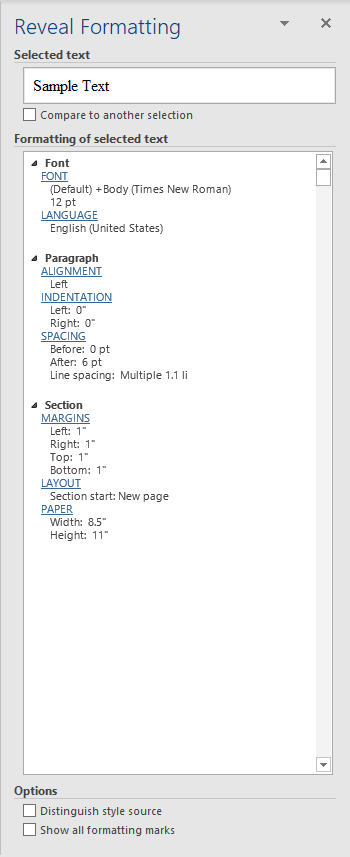
If you highlight a block of text (or even put your cursor in the middle of a word), Reveal Formatting will tell you how that text is formatted — what font, what paragraph settings (indentation, alignment/justification, etc.), what paper size and margins the document has, everything.
How do you see this magic pane? Press SHIFT-F1 in Word 2007 and up.
Here’s a nice touch: You see how the section headings (Font, Alignment, etc.) are hyperlinked blue underlining)? That means that, if you want to change any settings, you can simply click on that hyperlink, and Word will take you directly to the appropriate menu. Brilliant! (This works better if you have a block of text highlighted rather than just having your cursor sitting in the middle.)
And here’s the best part (and unless I’m mistaken, WordPerfect won’t even do this): You can compare the formatting between two different sections of text. This feature helps diagnose formatting problems (“why is this paragraph so funky and the other one’s okay?”).
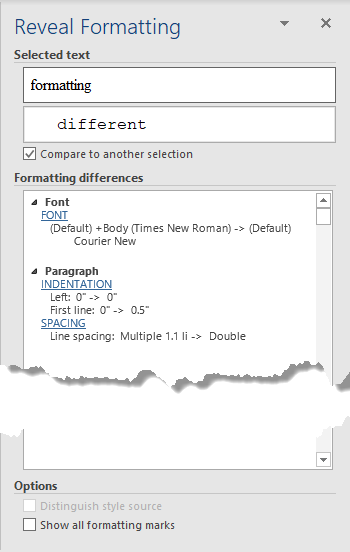
Here are the basic steps:
- Highlight the first block of text you want to examine.
- Check the Compare to another selection box.
- Highlight the second block of text, the one you want to compare the first to.
And here’s some video to show you how:
Voila! Word now tells you all the differences between the first block and the second, enabling you to diagnose any formatting issues.

I’ve used both Word and WordPerfect. The Reveal Formatting in Word will NEVER be as good a Reveal Codes in WordPerfect. Give me WordPerfect every time!
I agree with Linda Hill – exactly WHERE the formatting starts and stops is key to FAST typing. WORD seems to think users will have all the time in the world to highlight different portions of text to read a list. For instance, if I need to type something before a paragraph that is italicized, I type it then block it then un-italicize it. In WPerfect, one simply moved the cursor outside the code and typed. period. simpler for detail oriented perfectionists!
@Lyn – Actually, in Word, you could simply use CTRL-I to toggle italics on/off – no text selection required. A lot of the formatting in Microsoft Word can be controlled that way. See http://legalofficeguru.com/list-of-word-keyboard-shortcuts/ and http://www.attorneyatwork.com/articles/handy-keyboard-tricks/ for details.
where can i get wordperfect as a standalone? my old comp died, i’ve got another ‘used’ one but wp opens, then freezes. i don’t want an entire office suite, i just want my reveal codes! i saw a screen shot of wp4.1 in dos and omg, it brought back memories, lol! but now i’m back to crying, because i HATE MSword and I want my wordPERFECT back!
I don’t think they offer it as a standalone anymore. You might try Ebay to see if a vendor there can sell you a copy of an older version.
Thanks for the tip. I been complaining since at least the turn of the century about the lack of reveal codes on Word. The WP reveal codes easily allowed the user to fix formatting problems, usually by just deleting unwanted formatting by a backspace or two with the cursor. My office staff assumed I knew more about computers then I really do until I showed them how easy it was. WP was a better product then Word, but we were basically had little choice but to switch to the Office Suite and now to Office 365 to keep up. I did know about Reveal Formatting in Word, but did not find it that helpful. However, after reading your informative article I’m giving it another shot.
If you really, really miss Reveal Codes, you might try the free plug-in CrossEyes. See my review at http://lawyerist.com/reveal-codes-crosseyes-review/.