
One of the things I’m on a rant about these days is loooooong documents. Complicated documents, like 20+ page contracts and appellate briefs and stuff like that.
Why? Because they always seem to need special stuff inserted in them. Like custom headers and footers. And level-1 and level-2 and level-out-the-wazoo headings. It’s enough to make your head spin.
But if you’ve got mad skills and you plan your document right, a lot of this stuff becomes easier. Like putting in a simple table of contents, for example.
And if one of your mad skills is using the Styles feature to format your document headings, that’s going to make it way easier to pull together an automated table of contents. Once you’ve marked each heading and subheading with the appropriate level style, those same styles can be the basic building blocks for a table of contents that updates itself. (How cool is that?)
Here, let me show you:
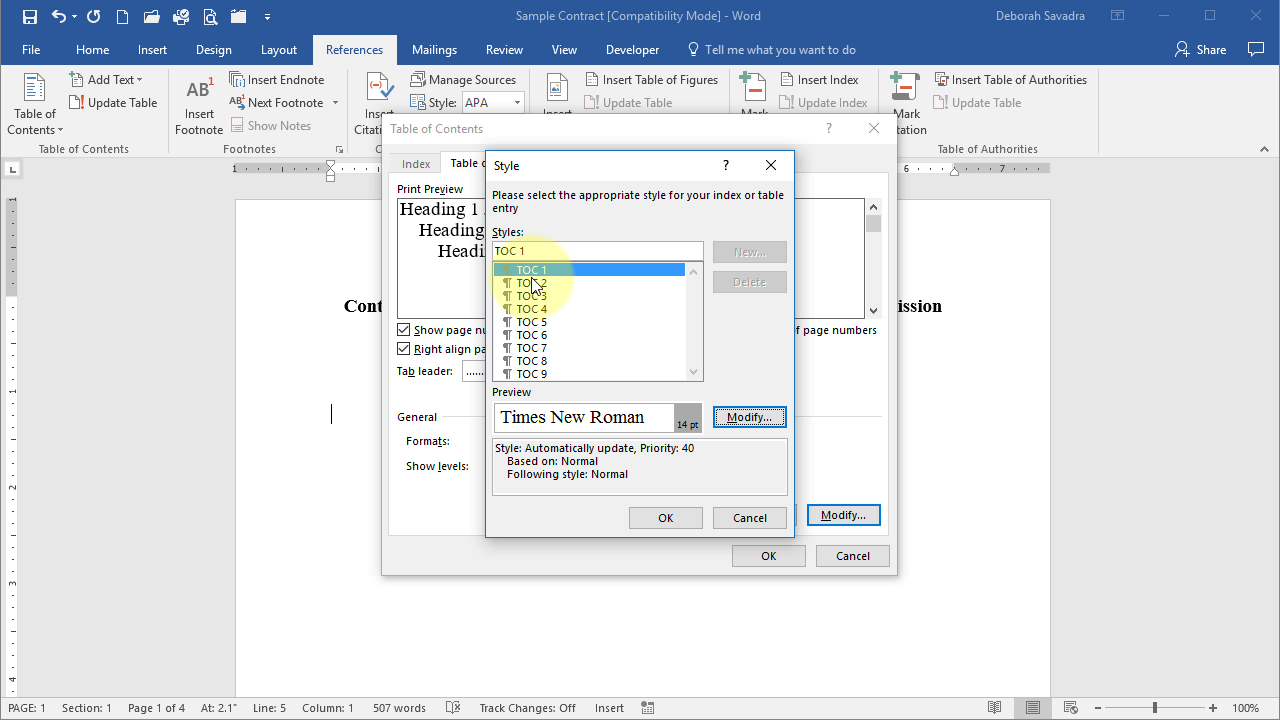
See, that’s not so hard, is it?
Once you’ve inserted your Table of Contents, you might want to modify the formatting. Click here to learn how.
This content is part of a course
What you’ve learned here is just a small part of my Brief Builder’s Workshop course, where you can learn all sorts of skills for building better briefs, such as creating a Table of Authorities and configuring a Table of Contents (two ways). Click here for more information.

Thank you. I have a class of students who will be very happy when I share your post with them.